Credits: what spends them and what does not
Two separate currencies, what each one pays for, and why you do not pay for the AI's mistakes.
There are two currencies, on purpose
| Currency | Pays for | When it is charged |
|---|---|---|
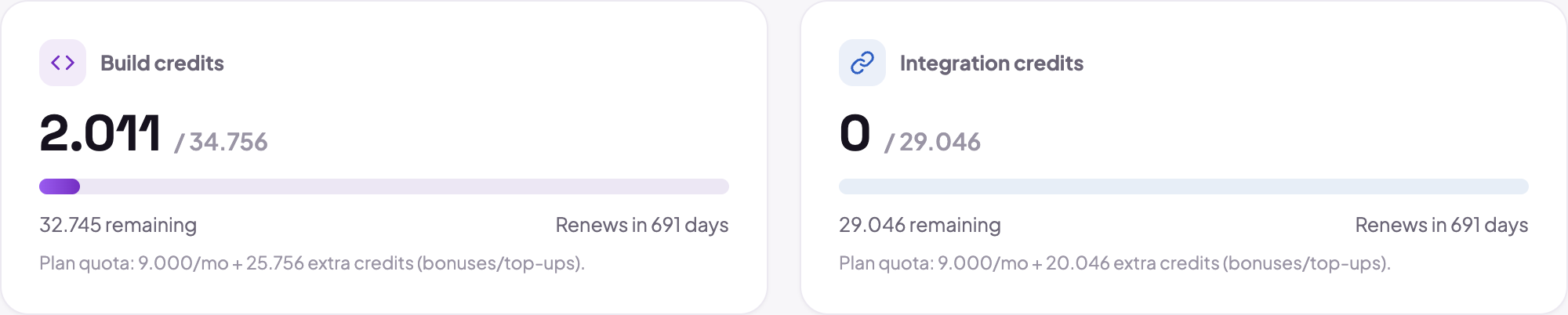
| AI credits | building the app | when you ask the assistant for something and it generates code |
| Integration credits | running the app | when the published app sends email or SMS, uses AI or video |
They do not mix. That is what keeps a heavy night of editing from taking down the transactional email of an app already in service, and the success of a published app from eating the budget for continuing to build.
One AI credit is roughly 10,000 tokens. In practice: a small edit costs well under a credit, and creating an app from scratch usually consumes dozens.
On the Free plan the meter is in messages
Free is not measured in credits but in messages: 5 per day and 40 per month. A free account's credit balance is zero by construction, and that is not a crippled plan in disguise: this plan simply does not spend that currency. Advertising a limit in one unit and charging in another is how a wall turns into a trap.
You do not pay for the AI's mistakes
This is a platform rule, not a case-by-case courtesy:
- QA, self-repair and visual review are not billed. A large slice of the pipeline's work is never invoiced to anyone: it is the platform checking its own work.
- A failed build is refunded, automatically, for whatever that build had charged.
- Fixing an app the platform broke costs no credits. If the app does not compile because of a defect of ours, the repair is on us.
What is charged is the generation work that actually produced code for you.
If you cancel a generation midway, what was spent was spent, because the model had already been called. But if that build ends in failure, the refund still applies.
What costs no credits at all
- editing visually from the preview (dragging, changing text, clicking and changing);
- touching Brand, Domains, Integrations, Authentication, SEO and Settings;
- publishing and unpublishing;
- undoing and restoring versions;
- viewing, exporting and importing data.
In other words: almost everything with a button of its own is free. Credits are for the AI's work.
When the credits run out
Published apps stay online, normally. What stops is building: you cannot keep editing with the AI until the quota renews or you upgrade. Nothing is unpublished and nothing is deleted.
The quota is monthly, renews on the subscription's anniversary and does not roll over.
Where to see what you spent
In the panel, under Billing, you find the balance, the month's usage and the invoices.
 At the end of each round, paid accounts also see the cost of that specific round inside the Studio, which is the most direct way to find out what kind of request is expensive for you.
